I’m setting up AI for
Compare ChatGPT and ClaudeClaude

Give Claude your files and your way of working.

Configure Claude’s agent capabilities with selected folders, connected apps, and your working preferences. Use the system to develop a document from your own materials and save a useful process as a reusable skill.

$500
2 hours together on a video call

Appellate drafting support

“Working with him made the process more efficient, and we saved valuable time with his help.”
Lisa Frey · Appellate Brief Writer

One example of what we could build

Turn a deposition into a workflow you can use again.

The assignment

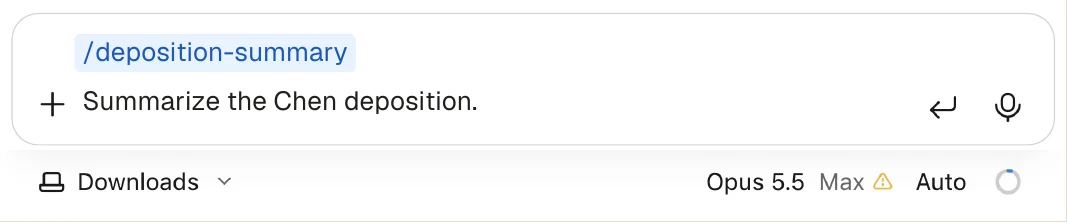
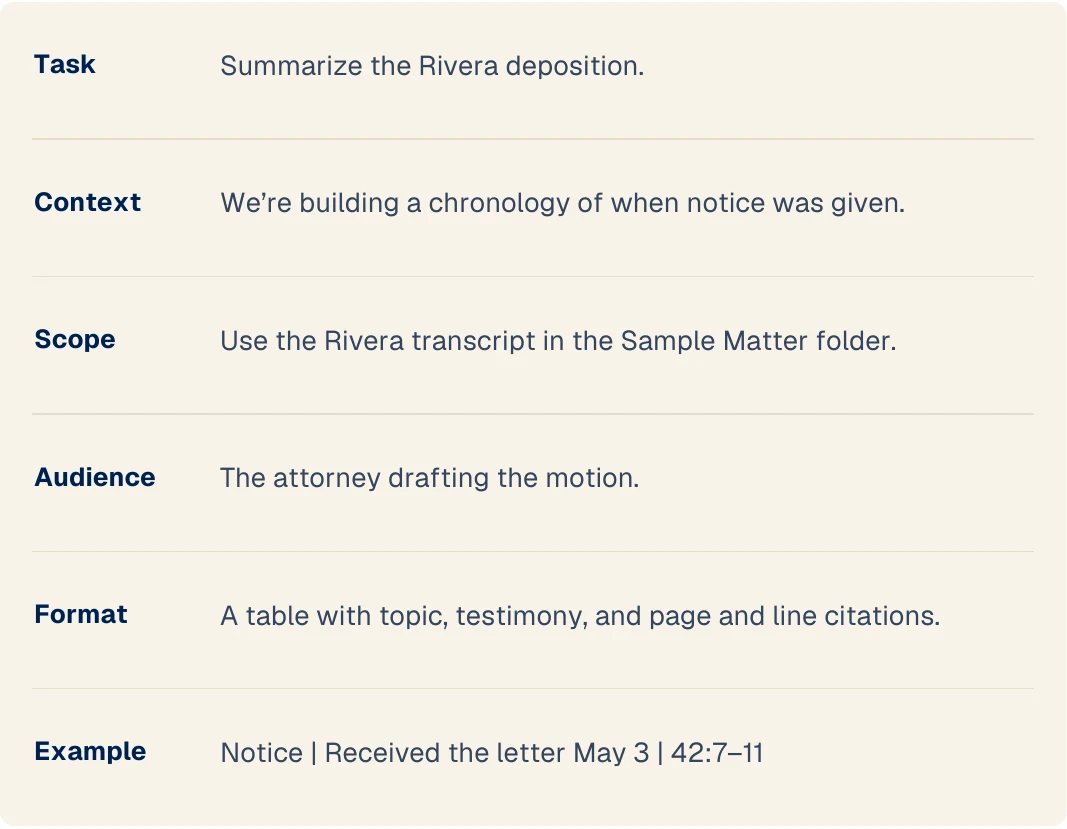
Summarize the Rivera deposition in the Sample Matter folder for the attorney drafting the motion. Focus on when notice was given. Give me a table with topic, testimony, and page and line citations.

The useful result: A reviewable summary and a deposition-summary skill built around your preferred format and source checks.

FoldersConnectorsSkills

After booking, we agree on one achievable workflow before the session. This example illustrates the process; your task and available connections shape the setup.

From the free step-by-step guide

A clear assignment. A reusable skill.

The six parts of the Rivera deposition-summary assignmentExample of reusing the deposition-summary skill for the next transcript

The guide shows the steps. In your setup, we connect your tools, practice with your materials, and tailor the workflow to your preferred output.

Read the free walkthrough →
Optional: official Claude walkthroughSee the official Claude walkthrough ↗

Built for your working day

Your tools. Your computer.

Choose the computer you use for work, even if you’re browsing on your phone. These choices carry into booking and preparation.

Tailor your setup

Claude on your work computer

  1. Install Claude Desktop and sign in to the account you’ll use for work.
  2. We’ll confirm your operating system and any installation restrictions before the session.
  3. Bring the email, file, and calendar tools you want to use. We’ll confirm which connections are available.
  4. Bring one task and sample files you’re authorized to use. We’ll test the result together.

Choose a time → pay → prepare for the session.

See the Claude desktop walkthrough →

Get your AI setup.

Your two-hour setup

$500 one-time setup

One person · One platform · 2 hours on a video call

A complete setup: configured AI, tested connections, one practiced workflow, and a configuration record.

Requires a qualifying $100-level personal plan or Premium team seat, paid separately.

Not sure which plan? Help me choose →
Have a promo code?

Checking scheduling availability…

Your booking options will appear here shortly.

Choose your subscription above to continue, or select an option for help.

Setting up a team? Ask for a quote →

What you leave with

Built around your practice.

  • Your AI, connected.Your setup configured and the agreed connections tested.
  • A real task, done together.One useful workflow built with hands-on practice.
  • A setup you can keep using.A record of your configuration to keep.

Claude setup guide + 4 quick references. Free to everyone.

Read the complete guides online. Enter your email only for the PDFs. No setup purchase required.

Read the free guides →
Compare ChatGPT and Claude
ChatGPT

Put your tools and files to work in ChatGPT.

  • Connect your email and files
  • Set models and reasoning for your work
  • Practice delegating a real assignment
View qualifying subscriptions

Requires a qualifying $100-level subscription. Setup covers one person.

  • ChatGPT Pro$100, $200, or $500/month

    Personal subscription

  • Business Premium seat$125/person/month

    Monthly billing · setup for one Premium seat

Choose ChatGPT Pro or a Business Premium seat. After booking, we’ll confirm Work access, available features, and any required administrator permissions before the session. Ask before paying if you’re unsure whether your account qualifies.

ChatGPT setup details →
Claude

Give Claude your files and your way of working.

  • Connect your folders and apps
  • Teach Claude your working preferences
  • Save a drafting process as a reusable skill
View qualifying subscriptions

Requires a qualifying $100-level subscription. Setup covers one person.

  • Claude Max 5x$100/month

    Personal subscription

  • Claude Max 20x$200/month

    Personal subscription

  • Claude Team Premium seat$125/person/month

    $100/person/month billed annually · Team requires at least two seats; this setup covers one person

Choose Claude Max or a Team Premium seat. Claude is bringing Cowork capabilities into its main app; I’ll configure the experience available in your account. Team connections may require administrator approval.

Claude setup details →

No subscription yet? I recommend ChatGPT Pro ($100/month) for individuals or a Business Premium seat ($125/user/month) for teams. Ask me before you subscribe if you’re unsure.

100% money-back guarantee

If your setup wasn’t worth the fee, contact me for a full refund.

Setup refund policy ↗

Let’s talk

Prefer to talk with Wesley first?

Ask about your software, subscription, or a time that works for you.

Wesley@AICoachingForLawyers.com

Email Wesley
Send a message here instead
Send Wesley a message

Your setup: For me · Not sure yet · Not sure yet

Add phone or firm (optional)

Please do not include client names, confidential facts, privileged material, or documents.

Privacy policy ↗

Before we get started

A few practical questions.

Read the setup terms ↗
View qualifying subscriptions

Requires a qualifying $100-level subscription. Setup covers one person.

  • Claude Max 5x$100/month

    Personal subscription

  • Claude Max 20x$200/month

    Personal subscription

  • Claude Team Premium seat$125/person/month

    $100/person/month billed annually · Team requires at least two seats; this setup covers one person

Choose Claude Max or a Team Premium seat. Claude is bringing Cowork capabilities into its main app; I’ll configure the experience available in your account. Team connections may require administrator approval.

Will we use Cowork, skills, and connectors?

We configure the agent experience available in your Claude account, including Cowork capabilities where applicable. We choose relevant folders and supported connectors, add your preferences, and save a useful process as a skill when that fits your workflow.

How does booking work?

Choose an available time, pay to confirm your booking, then prepare for the session. We hold your time during checkout. Your confirmation and calendar invitation include the video call link. If the calendar is unavailable or no time works, contact Wesley to arrange a time before paying.

What if none of the available times work?

Text Wesley at 425-698-5279 and we’ll find a time together. You can ask about timing before you buy. After payment, the confirmation page and booking email also include a Text Wesley option.

Text Wesley about availability
Which subscription do I need?

A qualifying $100-level or higher personal plan or Premium team seat. The listed annual-billing variants also qualify. This is my service requirement so you have substantial usage available. Software fees are separate. Select your plan when booking; we confirm feature access as we prepare for your session. If you’re unsure about eligibility, ask me before paying.

Can you connect Outlook, OneDrive, or Clio?

Connections depend on your chosen AI platform. For ChatGPT, we can use Outlook and supported SharePoint or OneDrive work or school files. Clio’s Vincent connection requires eligible Vincent or Clio Work access. After booking, we confirm your accounts, permissions, and the specific task before the session. Ask before paying if a particular connection is essential to you.

Do I need my firm’s approval to connect work accounts?

Check your firm’s policies and any required administrator approval before connecting accounts. After booking, we confirm the specific accounts, permissions, and task before the session. Review the access each connection requests before approving it.

How should I handle confidential client information?

Please don’t submit confidential client information through this website or by text. Handling of matter materials is arranged directly with you before they are used. Bring only materials you’re authorized to use; a fictional example is fine for practicing.

When is the setup complete?

Your system is configured, the agreed connections are tested, one agreed workflow has been demonstrated successfully, you’ve practiced using it, and you’ve received your configuration record and the matching free guides for your chosen platform. After booking, we agree on the platform, connections, and workflow before the session.

What should I bring to our video call?

After booking, prepare your computer, access to your qualifying account and approved tools, and a task you want help with. We’ll confirm the connections and workflow before the session, then work together for 2 hours. Be ready to explain your work, ask your AI follow-up questions, and review what it produces.

Can you set up my whole team?

The standard $500 package covers one person on one platform, including one qualifying team seat. Additional people and all Enterprise subscriptions need a separate quote.

Request a team quote →
Can you automate a task for me?

Yes—we agree on one achievable workflow and build and test it together using the platform’s supported tools. A recurring task or automation can be that workflow where supported. More workflows or a larger implementation can be scoped separately.

What if I want more help afterward?

You can hire me for additional AI coaching or attorney-directed legal assistance at $150/hour. Ongoing coaching is separate from the setup package.

Explore hourly legal support →

Make your AI subscription work harder.

Two hours together. A connected AI agent. A real task from your practice.

Get my AI setup Configured tools, a practiced workflow, and a money-back guarantee.

Other ways to work with Wesley.

Appellate drafting support

“Working with him made the process more efficient, and we saved valuable time with his help.”
Lisa Frey · Appellate Brief Writer

Hourly help

$150per hour

AI coaching or attorney-directed research and drafting. Work with me on a video call or send an assignment.

Explore hourly help

Flat-fee drafting

Fixed feeagreed in advance

Researched, cited motions, memos, and briefs under your direction. Receive a written quote before work begins.

Explore flat-fee drafting