Part 1 · Setting up
Install ChatGPT and start in Work
Use the desktop app to find, create, or edit documents on your computer.
- Download ChatGPT Desktop for Mac or Windows →
Start a chat
New chat → Work
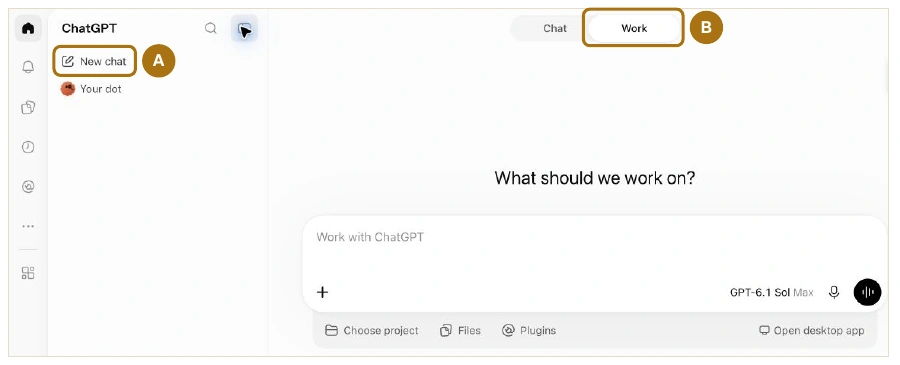
Why use Work?
- See the plan
- Follow progress
- Steer as it works
Connect your software.
- Open Customize → Plugins. Click + beside your app.
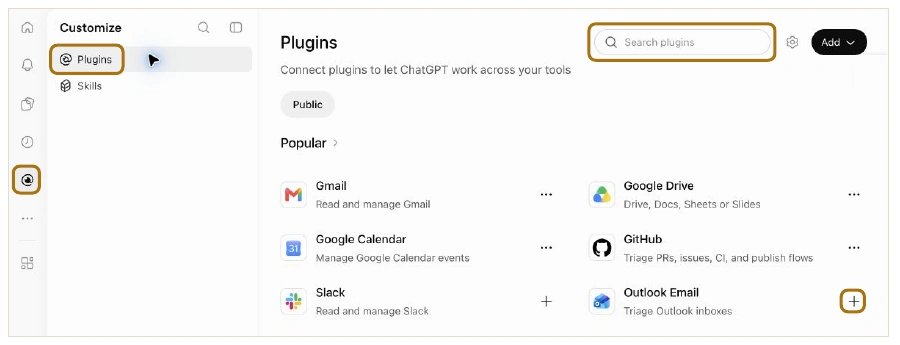
- Gmail · Outlook Email
- Calendar
- Google Calendar · Outlook Calendar
- Files
- Google Drive · Dropbox · SharePoint
- Messages
- Slack · Teams
Check email, messages, and the Sample Matter folder for the Rivera matter. List open issues, then draft an invite for a 30-minute case review when the team is free.
Part 2 · Intelligence vs Usage Limit
Choose the judgment and work ethic your task needs
- Open the model control.
- Click the model above the effort slider.
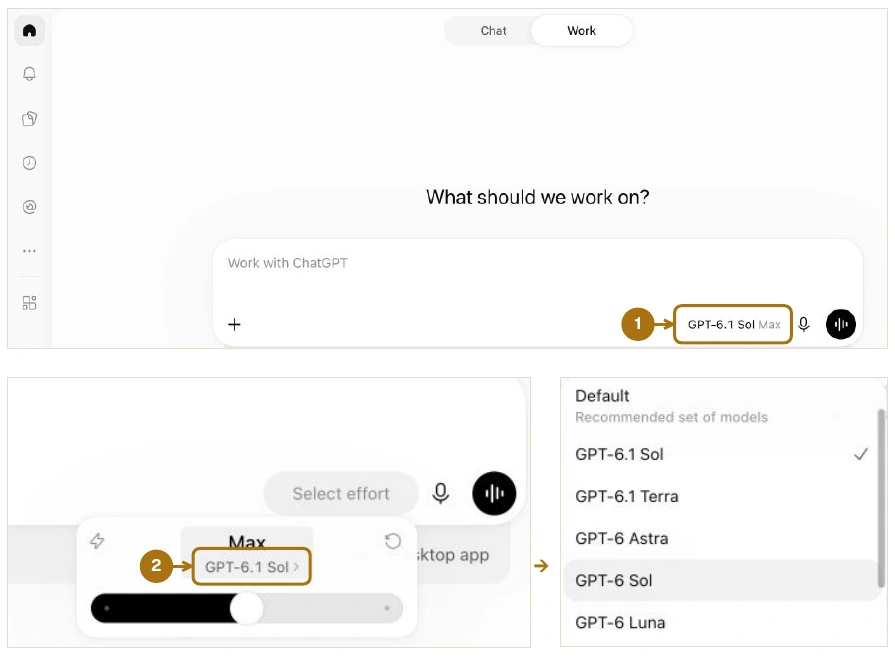
- Luna
- High school
- Terra
- Bachelor’s
- Sol
- Master’s
- Astra
- PhD
Set the effort.
- Open the model control. Move the slider to Max.
How far should ChatGPT look before it answers?
Stop at a likely answer → Dig deeper and verify
Light → Medium → High → Extra High → Max
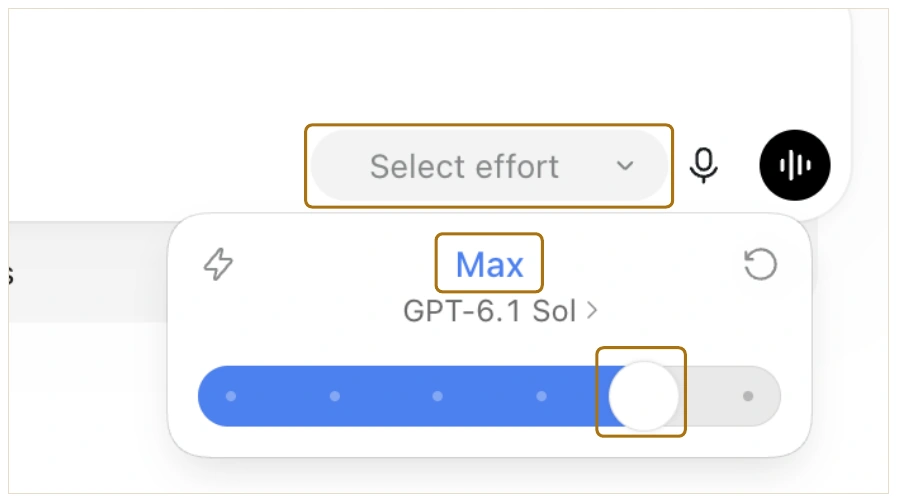
Ultra · Parallel searches · Heavy usage
Start with GPT-6.1 Sol + Max
Check usage. Adjust settings.
- Click the bottom-left circle. Hover over Weekly limit.
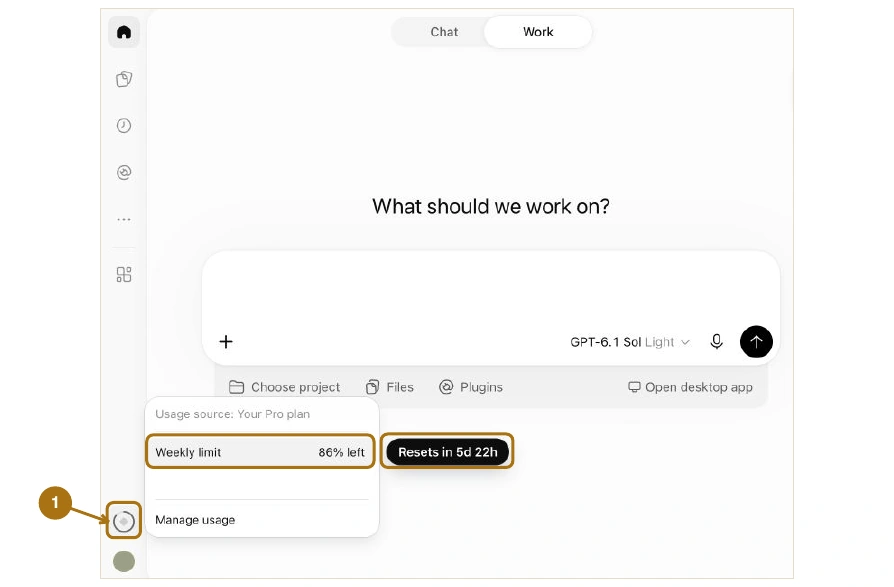
Running low?
Terra + High or Sol + High
Limit reached?
Use an available reset.
Switch to Chat if available.
Buy credits or wait for the reset.
Part 3 · Useful Tips
Prompting tips.
- Task
- Summarize the Rivera deposition.
- Context
- We’re building a chronology of when notice was given.
- Scope
- Use the Rivera transcript in the Sample Matter folder.
- Audience
- The attorney drafting the motion.
- Format
- A table with topic, testimony, and page and line citations.
- Example
- Notice | Received the letter May 3 | 42:7-11
Use only the tips your task needs.
My favorite prompts.
How can this be improved?
How can this be improved to persuade the judge to grant our motion?
AUDIENCE · GOAL
Create a plan to [goal].
Ask for edits, or say “Implement the plan.”
Get IT help with a screenshot.
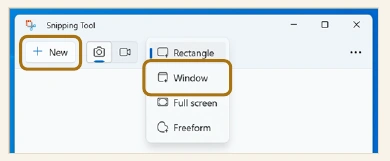
Capture the window you need help with.
Windows
In Snipping Tool, choose Window → New and click the window.
Copy the snip with Ctrl + C.
Mac
Press Shift + Command + 5.
CAPTURE
Capture Selected WindowSAVE TO
Options → ClipboardClick the window.
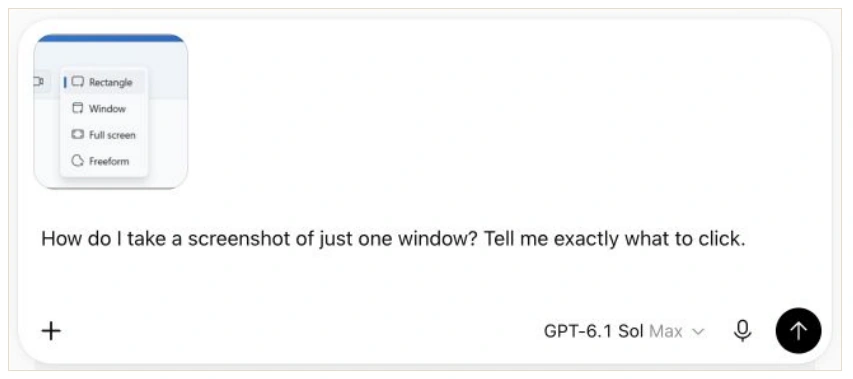
Paste into ChatGPT and ask your question.
Ctrl + V on Windows · Command + V on Mac
Typing the same prompt repeatedly?
A skill is a prewritten prompt you can update over time.
Create the skill.
@skill-creator Turn this deposition-summary workflow into a skill called Deposition Summary. Organize testimony by issue, cite page and line, and flag conflicting testimony.
Use it for the next deposition.
@Deposition Summary Summarize the Chen deposition.
Give feedback and update the skill.
Chen deposition
Notice · Chen received the letter May 3.
Source · Transcript 42:7-11.@skill-creator Put testimony about notice first. Update Deposition Summary so future summaries start there.
Work with Wesley Higbee
AI Coaching for Lawyers
Set up ChatGPT for your legal work.
Connect your tools. Practice a legal workflow. Keep instructions you can use again.
$500 · Two-hour video call · 100% money-back guarantee
Get my ChatGPT setup